
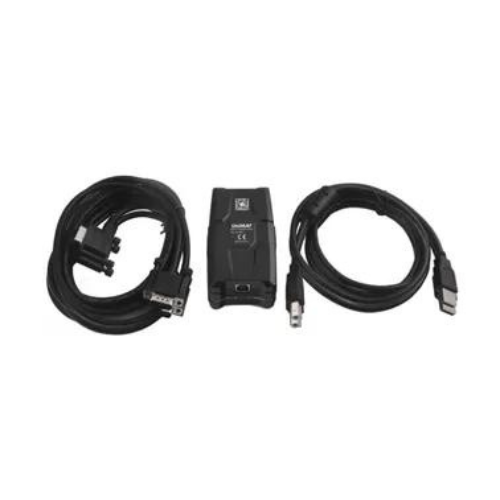
Siemens Communication Cable
Siemens Communication Cable for PLC programming, commissioning, and diagnostics—used to connect a PC/PG/HMI to SIMATIC systems. We help match the correct cable by PLC model + port type + required interface to avoid wrong orders.
Siemens communication cables are used to establish a reliable link between a programming device (PC/PG), HMI, or automation equipment and a Siemens PLC system for program download/upload, online monitoring, fault diagnostics, and commissioning.
Because Siemens PLC families use different communication ports, the “right” communication cable depends on your setup:
- S7-1200 / S7-1500 commonly connect via Ethernet/PROFINET (RJ45).
- S7-300 / S7-400 often use MPI/PROFIBUS (DP) or Ethernet (depending on CPU/interface modules).
EKA supplies Siemens communication cables and suitable variants for different interfaces and installation needs. If you share a photo of the PLC port or the CPU/order number, we’ll confirm compatibility before dispatch.
Specifications
- Product Type: PG/PC communication cable / USB communication adapter for SIMATIC
- Primary Function: Connects a PC/laptop (USB) to a SIMATIC S7 MPI/DP (RS485) interface for programming, commissioning, and diagnostics.
-
Interfaces:PC side: USB (USB 2.0 / High-Speed on common variants)PLC/Network side: MPI/DP (typically 9-pin Sub-D RS485)
-
Supported Networks: MPI / PROFIBUS DP (variant dependent)
-
Transmission Rates (typical):Many variants support 9.6 kbit/s up to 12 Mbit/s (network/device dependent)Some older/legacy variants may support speeds up to 1.5 Mbit/s
- Power Supply: Typically powered via the USB connection; common variants provide electrical isolation between USB and MPI/DP within an SELV circuit.
- Protection Class (typical): IP20
- Operating Temperature (typical): 0…60 °C
- Dimensions / Weight (typical): approx. 105 × 58 × 26 mm, ~0.365 kg
Benefits
- Correct connectivity for programming & diagnostics (avoids connection failures)
- Faster commissioning with the right interface match (Ethernet / MPI / PROFIBUS)
- Reduced downtime by preventing wrong-cable purchases
- Cleaner, stable communication when using the correct connector and shielding
- Dealer support: selection guidance based on your PLC model and port type
Why Choose
- Reliable PLC connectivity: Ensures stable communication between your PC/PG/HMI and Siemens PLC for programming, monitoring, and diagnostics—especially during commissioning and troubleshooting.
- Correct interface matching: Siemens systems may use Ethernet/PROFINET or MPI/PROFIBUS interfaces; using the right communication cable avoids “no connection” issues and wasted site time.
- Better noise immunity: Industrial communication setups often face electrical noise; proper cable quality and shielding/connector fit helps reduce intermittent communication drops.
- Faster service & downtime reduction: A compatible cable makes program upload/download and fault checks quicker, helping restore production faster.
- Dealer support from EKA: We confirm compatibility using your PLC model/port photo and recommend the right variant—so you get the correct cable on the first order.
FAQ
1) What is a Siemens communication cable used for?
It’s used to connect a PC/PG/HMI to a Siemens PLC system for programming, monitoring, diagnostics, and commissioning.
2) Which Siemens communication cable is used for S7-1200 and S7-1500?
Most S7-1200/S7-1500 setups use Ethernet/PROFINET (RJ45). If you share your CPU model and port photo, we’ll confirm the correct cable type.
3) Which Siemens communication cable is used for S7-300 and S7-400?
Many S7-300/S7-400 systems use MPI/PROFIBUS (DP) for programming, or Ethernet if the CPU/module supports it. Cable choice depends on the available port.
4) Is Siemens MPI cable the same as PROFIBUS cable?
They can look similar but must match the exact interface requirement and connector type. Always confirm the PLC port/interface before ordering.
5) Can I program an S7 PLC using a normal LAN cable?
Only when the PLC supports Ethernet/PROFINET programming through an RJ45 port. If your PLC has MPI/DP only, you’ll need the correct adapter/cable.
6) How do I identify the correct Siemens communication cable if I don’t know the part number?
Send a clear photo of:
- PLC front port area
- CPU order number/nameplate
- Existing cable connector (if any)
We’ll match the right variant.
7) Do you supply USB-based Siemens communication cable options?
Yes, USB adapter-type variants may be required for laptops without serial/legacy ports. Compatibility depends on your PLC interface and software setup.
Yes, USB adapter-type variants may be required for laptops without serial/legacy ports. Compatibility depends on your PLC interface and software setup.
8) Where can I buy Siemens communication cable in India?
EKA is a dealer & distributor in India. Share your PLC model and interface requirement for a quick quote and correct matching.
EKA is a dealer & distributor in India. Share your PLC model and interface requirement for a quick quote and correct matching.
Reviews
There are no reviews yet.